
Updated August 6, 2026 — the international redirect can be disabled after all.
When this post was published, Amazon documented no way to turn the international redirect off, and this article said so. That turned out to be wrong.
An undocumented parameter, creatorsDisableRedirect=true, keeps shoppers in your own store. Content Egg Pro 21.3.0 supports it with a new No redirect option. The details are in Disabling the redirect entirely below, and the sections above it have been corrected.
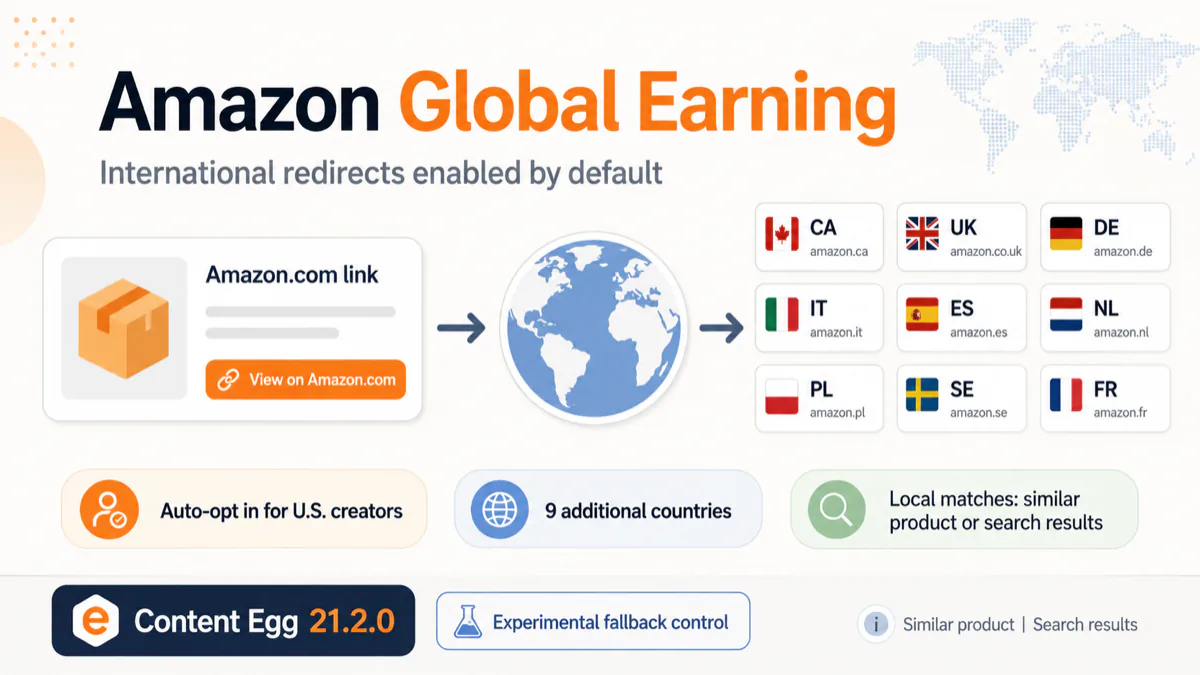
Amazon has rolled out a new feature called Global Earning for U.S. creators.
The important part is not only that U.S. affiliate links can now earn commissions internationally.
The bigger change is that all U.S. creators are automatically opted in.
No setup is required. Existing Amazon.com affiliate links now redirect international shoppers to their local Amazon store in nine additional countries:
- Canada
- United Kingdom
- Germany
- Italy
- Spain
- Netherlands
- Poland
- Sweden
- France
Amazon says creators can earn from a single U.S. account, without creating separate accounts or replacing existing links.
But there is one important detail that may surprise some affiliates:
Amazon provides no documented way to keep international shoppers on Amazon.com.
Global Earning is enabled automatically for all U.S. creators. The only control Amazon documents is what happens when the exact product is unavailable: send shoppers to a similar product, or to local search results.
An undocumented parameter does disable the redirect completely. Content Egg 21.3.0 supports both behaviors.
What is Amazon Global Earning?
Global Earning automatically localizes U.S. Amazon affiliate links.
When an international shopper clicks an Amazon.com affiliate link, Amazon sends them to the corresponding local Amazon store.
For example, a visitor from Germany may be redirected from Amazon.com to Amazon.de.
Amazon then tries to find:
- The exact same product.
- A similar product if the exact one is unavailable.
- Local search results if no suitable product match is found.
If the shopper completes an eligible purchase, the affiliate earns the commission rate defined by that local Amazon Associates program.
Amazon describes the feature like this:
Your existing links will begin working internationally immediately — no setup, no new links, and no changes to your workflow required.
This is available automatically to all U.S. creators.
Do you need to enable it?
No.
According to Amazon’s FAQ:
All US creators are automatically opted in.
This means Global Earning can affect existing links even if the affiliate never enabled OneLink or configured any international Amazon accounts.
Amazon also says that creators do not need a separate account for every country.
International earnings appear in the existing dashboard, with a country selector for viewing performance.
Payments are still handled separately by each Amazon entity, and creators may need to add payment preferences for each country.
Canada also requires additional tax information before Amazon can issue payments there.
Can international redirects be disabled?
Not through anything Amazon documents.
Amazon’s FAQ describes no account-level or per-link option to switch the international redirect off. International shoppers are redirected to their local Amazon store automatically.
The only documented control is what Amazon should do when the exact product is not available in the shopper’s country.
Amazon exposes this as a “Show local matches” toggle in:
- SiteStripe on desktop
- Mobile GetLink
This is a per-link setting.
It does not disable Global Earning or keep the shopper on Amazon.com. It only changes the fallback behavior.
There is, however, an undocumented parameter that does disable the redirect. It is covered in Disabling the redirect entirely below.
What does “Show local matches” control?
When the setting is enabled, Amazon may redirect the shopper to a similar product.
That similar product may not be identical to the original product and may even come from a different brand.
When the setting is disabled, Amazon only redirects to an exact local product match.
If no exact match exists, the shopper is sent to local Amazon search results instead of a similar product page.
So the behavior is:
Show local matches enabled
- Exact product if available
- Similar product if no exact match exists
- Search results if Amazon cannot find a suitable match
Show local matches disabled
- Exact product if available
- Search results if no exact match exists
The international redirect still happens in both cases.
This matters when you test the toggle. If the product you are testing with also exists in the local store, both settings send you to the same local product page, and the toggle looks like it does nothing. To see a difference you need a product that is not sold in the shopper’s country.
SiteStripe link parameters
I generated two SiteStripe links for the same product to compare the URLs.
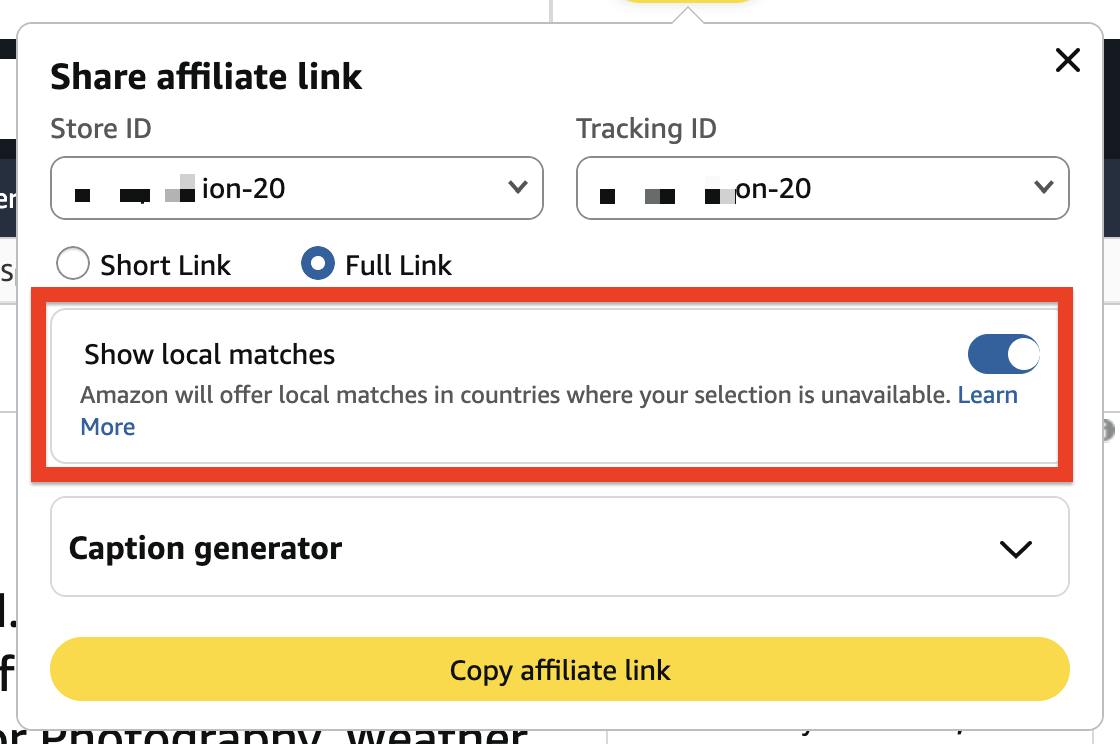
With Show local matches enabled, Amazon added:
gaOptInStatus=true
With Show local matches disabled, Amazon added:
gaOptInStatus=false
optOutTS=1785872629309
The optOutTS value appears to be a timestamp generated when the link is created.
The linkId also changes between links, but SiteStripe normally creates a new linkId each time a link is generated, so it is probably not the actual fallback setting.
The relevant parameters appear to be:
gaOptInStatus=false
optOutTS=<timestamp>
However, Amazon does not currently document these parameters publicly.
Disabling the redirect entirely
After this post was published, a Content Egg user reported a parameter that does what Amazon’s FAQ says is impossible:
creatorsDisableRedirect=true
Append it to an affiliate link and the international redirect stops. The shopper stays in the store the link points to.
The parameter appears to originate in the Influencer Program storefront, where redirect behavior is a configurable setting. It is not documented for the standard Associates program.
The case that surfaced it is worth describing, because it is the situation where Global Earning hurts most. The affiliate runs a German site but promotes products from the U.S. catalog, because Amazon.com carries items Amazon.de does not. Global Earning sent every German visitor to Amazon.de, where those products are different or missing entirely.
They tried the SiteStripe “Show local matches” toggle first. It made no difference, which is expected: that toggle changes the fallback, never the redirect itself.
creatorsDisableRedirect=true solved it.
Two caveats. The parameter is undocumented, so Amazon can stop honoring it at any time without notice. And disabling the redirect means giving up international commissions entirely — a deliberate trade, not a free win.
Content Egg support
Content Egg Pro adds a Global Earning setting to both the Amazon API module and the Amazon NoAPI module.
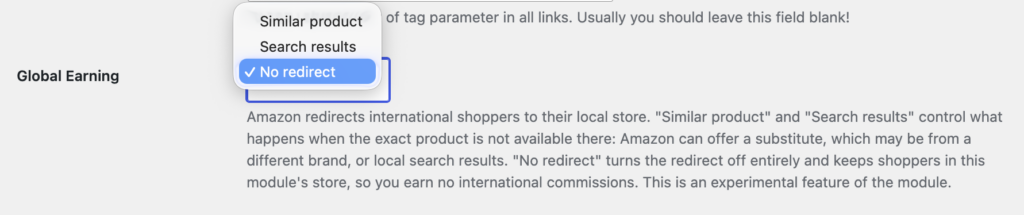
Available values:
- Similar product — Amazon’s default behavior
- Search results — adds
gaOptInStatus=false, so Amazon does not substitute a different product - No redirect — adds
creatorsDisableRedirect=true, so shoppers stay in the module’s own store
Selecting Similar product keeps Amazon’s default behavior.
Selecting Search results tells Amazon not to redirect shoppers to a merely similar product when the exact product is unavailable. Instead, the shopper should land on local Amazon search results. This is useful for affiliates who do not want Amazon replacing the promoted product with a different model or brand.
Selecting No redirect stops the localization completely. Useful when you deliberately curate one store’s catalog for readers in another country.
The setting is per module, and that includes cloned modules. If you run a German Amazon module alongside a U.S. clone, you can leave the German module on the default and set No redirect on the U.S. clone only.
The setting is marked experimental, because both parameters are undocumented by Amazon.
What this means for affiliates
The main benefit is obvious.
U.S. creators can now monetize international traffic without generating separate affiliate links for every supported Amazon store.
But there is also a tradeoff.
An affiliate may link to one product, while an international visitor is redirected to a different product Amazon considers similar.
That product may have:
- Different specifications
- Different pricing
- Different reviews
- A different seller
- A different brand
This is especially important for detailed product reviews and comparisons where the exact product matters.
For these articles, sending the shopper to search results may be safer than automatically replacing the original product with a different one.
For broader roundup articles, gift guides, or generic product recommendations, similar matching may be acceptable and may produce better conversion rates.
And if your site is built around one store’s catalog for an audience in another country, disabling the redirect is the only option that keeps your content and your links pointing at the same product.
What we know so far
Amazon Global Earning is now automatically enabled for all U.S. creators.
Existing U.S. affiliate links can earn commissions in nine additional countries without additional setup.
International visitors are automatically redirected to their local Amazon store.
Amazon documents no way to disable this redirect, but the undocumented creatorsDisableRedirect=true parameter does disable it, and this has been confirmed by a reader in Germany.
Creators can control three behaviors:
- Redirect to a similar product when the exact one is unavailable
- Redirect to local search results instead of a similar product
- Do not redirect at all
Content Egg Pro supports all three in the Amazon API and Amazon NoAPI modules.
The implementation is based on parameters found in Amazon-generated links rather than on documentation, so it still requires more real-world testing. The No redirect behavior has been confirmed in practice. The Search results fallback has not been confirmed yet, because it only differs when the exact product is missing from the shopper’s local store.
I will update this post when Amazon publishes more technical details or when enough real-world feedback is available.

With 20 years in affiliate marketing, Serge creates practical WordPress tools such as Content Egg and External Importer that help publishers manage and grow their affiliate sites.